In this article, we’ll be benchmarking some of the available RISC‑V single-board computers (SBCs) using Phoronix Test Suite (PTS). We'll be diving into both single-core and multi-core CPU performance to see how these boards handle real-world compute workloads.
We’ll also walk through the complete setup process for running Phoronix Test Suite (PTS) on RISC‑V hardware — so you can easily replicate the benchmarks on your own system.
1. System & Environment Details
All system, hardware and environment specifications used in this benchmark — including vendor, board name, OS, compiler version, SoC, CPU, cores, RAM, and RISC‑V extensions — are listed in the table below.
| Vendor | Board Name | OS | Compiler (GCC) | SOC | CPU | Cores | RAM GB | RISCV Extensions |
|---|---|---|---|---|---|---|---|---|
| StarFive | VisionFive V1 | Ubuntu 24.04.1 LTS | gcc/g++ 13.2.0 | JH7100 | U74 @ 1.2GHz + E24 | 2+1 | 8 | RV64GC |
| StarFive | VisionFive 2 | Ubuntu 24.04.1 LTS | gcc/g++ 13.2.0 | JH7110 | U74 @ 1.5GHz | 4 | 8 | RV64GC |
| Milk-V | Milk-V Jupiter | Bianbu 2.2 | gcc/g++ 13.2.0 | SpacemiT K1/M1 | X60 @ 1.6GHz | 8 | 16 | RV64GCVB, RVA22, RVV1.0 |
| Milk-V | Milkv Pioneer Box | Debian GNU/Linux 13 | gcc/g++ 14.2.0 | SG2042 | C920 @ 2.0GHz | 64 | 128 | RVV 0.7.1 |
| Banana Pi | Banana Pi BPI-F3 | Bianbu 2.2 | gcc/g++ 13.2.0 | SpacemiT K1 | X60 @ 2.0GHz | 8 | 16 | RV64GCVB, RVA22, RVV1.0 |
2. Setup and Installation
Download the latest release from github/phoronix-test-suite/releases and follow the README.md for more details if you want. In order to setup follow these steps:
# Setup User Dirs. & install phoronix
cd /home/$USER; mkdir -p projects/; cd projects/; mkdir -p phoronix-test-suite;
curl -L -o phoronix-test-suite.tar.gz https://github.com/phoronix-test-suite/phoronix-test-suite/releases/download/v10.8.4/phoronix-test-suite-10.8.4.tar.gz && \
    tar -xf phoronix-test-suite.tar.gz -C phoronix-test-suite
cd phoronix-test-suite/phoronix-test-suite
sudo bash install-sh   # Make sure to run as root
This should install PTS on your system. In order to confirm installation, run this command.
phoronix-test-suite # This should show all the available commands.
There are multiple options in PTS, and it supports hundreds of test suites. You can choose tests based on what you want to benchmark, such as CPU, memory, GPU, and more.
To view available tests and suites you can run these below commands:
phoronix-test-suite list-available-suites
phoronix-test-suite list-available-tests
Read all PTS commands details here for more details on PTS options and configurations.
3. Running CPU benchmark
In this article we will focus only on CPU benchmarking, and for that I've selected these benchmarks which I'll run on all the SBCs listed in the above table.
| Benchmark | Description |
| CoreMark | Measures the performance of core CPU operations (integer, control, memory). |
| CacheBench | Evaluates memory hierarchy performance including L1/L2 cache and RAM throughput. |
| NPB (NAS) | Benchmarks parallel computation performance using NASA kernels (OpenMP/MPI). |
| Compress-7zip | Tests CPU and memory performance by compressing files using the 7-Zip algorithm. |
| SciMark2 | Evaluates scientific computing performance with FFT, Monte Carlo, LU, etc. |
| OpenSSL | Measures cryptographic operations like AES, SHA, and RSA performance. |
| BYTE Unix Bench | General-purpose system benchmark testing CPU, I/O, and system call performance. |
| FFTW | Tests performance of Fast Fourier Transforms using the FFTW library. |
Use these below command to run these above tests.
phoronix-test-suite benchmark coremark cachebench npb compress-7zip scimark2 openssl byte fftw
Note: PTS normal mode is highly interactive and requires frequent user input, so it can't be run unattended or ignored.
3.1 PTS Batch Mode
This option is ideally non-interactive, but it may still prompt for user input in certain cases. For example, the cachebench test asks whether to run read, write, or all tests. However, you can pipe the required inputs to avoid manual interaction, making it a good option for remote or automated setups.
Use this cmd to run the above same tests in batch mode:
export TEST_LIST="coremark cachebench npb compress-7zip scimark2 openssl byte fftw"
phoronix-test-suite batch-benchmark $TEST_LIST
This will only prompt you to ask which particular sub-test to run or If you want to run all, use this below command.
# List of benchmarks to run
export TEST_LIST="coremark cachebench npb compress-7zip scimark2 openssl byte fftw"
echo -e "4\n11\n7\n2\n5\n3\n7" | phoronix-test-suite batch-benchmark $TEST_LIST
Note: This command will not ask for any user input while running -- so you are free to leave it running and have a coffee.
4. Auto-Setup PTS Script for RISCV
This script will automatically set up the Phoronix Test Suite (PTS), run the same CPU benchmarks listed above, and upload the results to OpenBenchmarking.org.
| #!/bin/bash |
| #===================================================================== |
| # Phoronix Test Suite - Automation Script |
| # Description: |
| # This script automates the setup and execution of Phoronix Test Suite (PTS), |
| # specifically running a CPU benchmark and uploading the results to |
| # OpenBenchmarking.org. |
| # It's designed for auto-run scenarios — — all user prompts are |
| # pre-handled within the script, making it ideal for remote execution and |
| # continuous integration (CI) workflows. |
| # Usage: |
| # sudo bash <script_name>.sh |
| # Notes: |
| # - Feel free to customize or Tweak it as needed :) |
| # Author: |
| # Akif Ejaz | github.com/akifejaz |
| #===================================================================== |
| set -euo pipefail |
| # Variables |
| LOG_FILE="./phoronix_$(date +%Y%m%d).log" |
| PHORONIX_URL="https://github.com/phoronix-test-suite/phoronix-test-suite/releases/download/v10.8.4/phoronix-test-suite-10.8.4.tar.gz" |
| #===================================================================== |
| # Helper Functions |
| #===================================================================== |
| RED='\033[0;31m'; GREEN='\033[0;32m'; YELLOW='\033[1;33m'; BLUE='\033[0;34m'; NC='\033[0m' |
| log() { |
| echo "$(date '+%Y-%m-%d %H:%M:%S') [$1] ${*:2}" | tee -a "$LOG_FILE" |
| case $1 in |
| ERROR) echo -e "${RED}[ERROR]${NC} ${*:2}" >&2 ;; |
| SUCCESS) echo -e "${GREEN}[SUCCESS]${NC} ${*:2}" ;; |
| WARNING) echo -e "${YELLOW}[WARNING]${NC} ${*:2}" ;; |
| *) echo -e "${BLUE}[INFO]${NC} ${*:2}" ;; |
| esac |
| } |
| die() { log ERROR "$@"; exit 1; } |
| check_sudo() { |
| log INFO "Checking sudo privileges..." |
| [[ $EUID -eq 0 ]] || die "Must run with sudo: sudo $0" |
| export USER="${SUDO_USER:-$(whoami)}" |
| } |
| #============================================================================== |
| # Phoronix Test Suite Functions |
| #============================================================================== |
| setup_phoronix () { |
| log INFO "Setting up Phoronix Test Suite..." |
| if command -v phoronix-test-suite &> /dev/null; then |
| log INFO "Phoronix Test Suite is already installed. Skipping installation." |
| return |
| fi |
| # Setup User Dirs. & install phoronix |
| cd /home/$USER; mkdir -p projects/; cd projects/; mkdir -p phoronix-test-suite; |
| curl -L -o phoronix-test-suite.tar.gz https://github.com/phoronix-test-suite/phoronix-test-suite/releases/download/v10.8.4/phoronix-test-suite-10.8.4.tar.gz && \ |
| tar -xf phoronix-test-suite.tar.gz -C phoronix-test-suite |
| cd phoronix-test-suite/phoronix-test-suite && sudo bash install-sh &>> "$LOG_FILE" |
| # TODO: Fix this please :) Its not working ... Unable to detect by alias |
| # echo "alias phoronix='phoronix-test-suite'" >> /home/$USER/.bashrc |
| # source /home/$USER/.bashrc |
| # # Check if phoronix is installed. |
| # if ! eval phoronix &> /dev/null; then |
| # die "PTS Install failed : $LOG_FILE" |
| # fi |
| # Alternatively, Check if phoronix is installed. |
| if ! command -v phoronix-test-suite &> /dev/null; then |
| die "PTS Install failed : $LOG_FILE" |
| fi |
| log SUCCESS "Phoronix Test Suite setup completed." |
| } |
| run_phoronix() { |
| log INFO "Starting Phoronix Test Suite..." |
| # Ensure OpenBenchmarking credentials are set |
| if [[ -z "${OB_USER:-}" || -z "${OB_PASS:-}" ]]; then |
| die "Please set your OpenBenchmarking credentials as environment variables OB_USER and OB_PASS." |
| fi |
| # Login to OpenBenchmarking.org |
| { |
| echo "$OB_USER" |
| echo "$OB_PASS" |
| } | phoronix-test-suite openbenchmarking-setup |
| # Optional: configure batch setup preferences |
| printf 'y\nn\nn\nn\nn\nn\nn\n' | phoronix-test-suite batch-setup |
| # Configure environment for non-interactive run |
| export PTS_NON_INTERACTIVE=1 |
| export PTS_SAVE_RESULTS=1 |
| # Define identifier: <user>_<hostname>_<YYYYMMDD_HHMM> |
| HOSTNAME=$(hostname -s) |
| USER=$(whoami) |
| DATE_TAG=$(date +%Y%m%d_%H%M) |
| export TEST_RESULTS_IDENTIFIER="${USER}_${HOSTNAME}_${DATE_TAG}" |
| # NOTE: You'll find the tests results with this name under ~/.phoronix-test-suite/test-results/ |
| # or /var/lib/phoronix-test-suite/test-results/ (when run as root) |
| export TEST_RESULTS_NAME="RISCV <> CPU Benchmark" |
| # List of benchmarks to run |
| TEST_LIST="coremark cachebench npb compress-7zip scimark2 openssl byte fftw" |
| log INFO "Running benchmarks: $TEST_LIST" |
| echo -e "4\n11\n7\n2\n5\n3\n7" | phoronix-test-suite batch-benchmark $TEST_LIST |
| log SUCCESS "Phoronix Test Suite run completed." |
| # phoronix-test-suite result-file-to-text "$TEST_RESULTS_IDENTIFIER" > "phoronix_summary_${DATE_TAG}.txt" |
| # log INFO "Results saved to: phoronix_summary_${DATE_TAG}.txt" |
| } |
| push_results () { |
| log INFO "Pushing results to OpenBenchmarking.org..." |
| for dir in /var/lib/phoronix-test-suite/test-results/*/; do |
| dirname=$(basename "$dir") |
| log INFO "➡ Uploading $dirname..." |
| { |
| echo 'y' |
| echo 'n' |
| } | phoronix-test-suite upload-results "$dirname" &>> "$LOG_FILE" && \ |
| log SUCCESS "✔ Done uploading $dirname" || log ERROR "✖ Failed to upload $dirname" |
| done |
| log SUCCESS "All results pushed successfully." |
| } |
| #============================================================================== |
| # Main Execution |
| #============================================================================== |
| main() { |
| log INFO "Starting Phoronix automation - Log: $LOG_FILE" |
| check_sudo |
| setup_phoronix |
| run_phoronix |
| push_results |
| log SUCCESS "PTS benchmark completed successfully. Check $LOG_FILE for details." |
| log INFO "You can view your results at https://openbenchmarking.org/user/${OB_USER}" |
| } |
| main "$@" |
view rawphoronix-cpu-benchmark-auto.sh hosted with ❤ by GitHub
Note: You will need to create account on Openbenchmarking in order to upload your results there.
5. Benchmark Results & Performance Comparison
By default, PTS runs benchmarks using all available CPU cores (multicore). To run benchmarks in single-core mode, export the environment variable PTS_NPROC=1 before executing the benchmark command.
5.1 BYTE Unix Bench
Results for multiple variants of BYTE Unix Bench.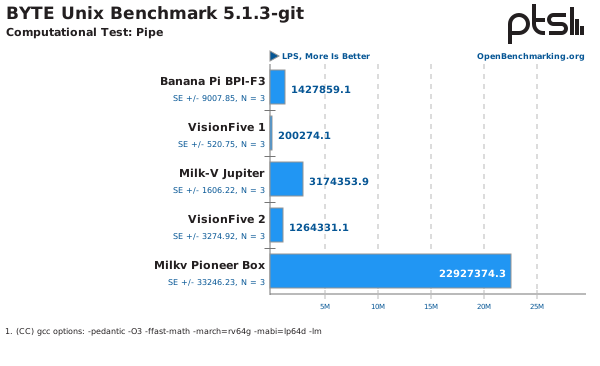
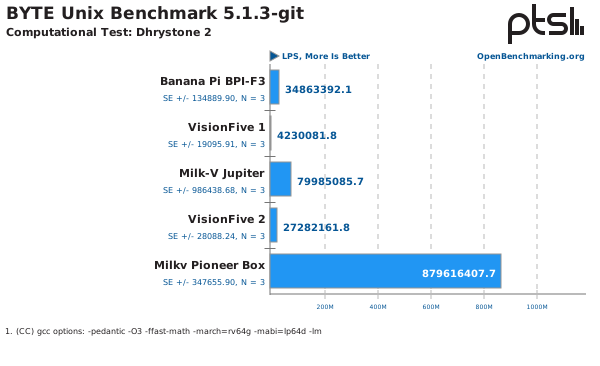
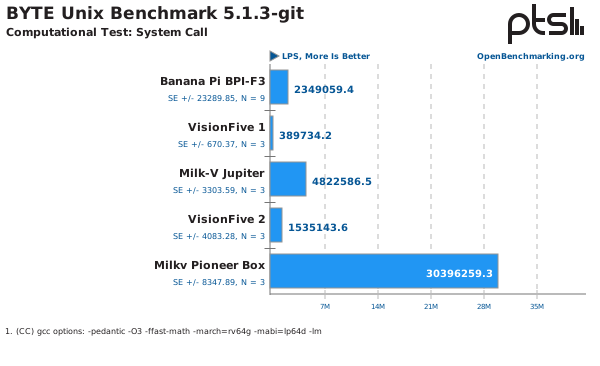
5.2 CacheBench
Results for multiple variants of CacheBench.
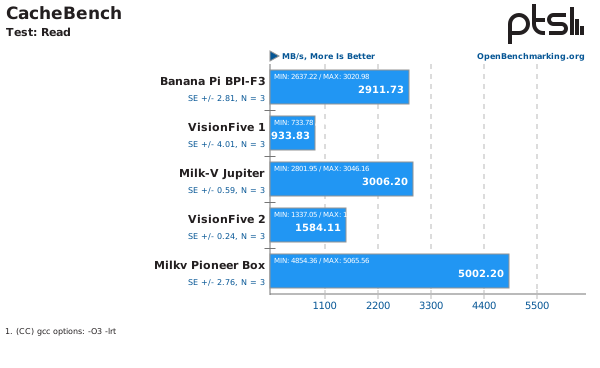
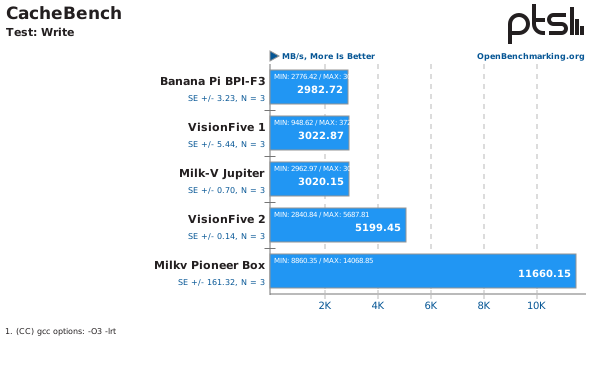
See more results and details here.
5.3 SciMark
Results for SciMark are below.
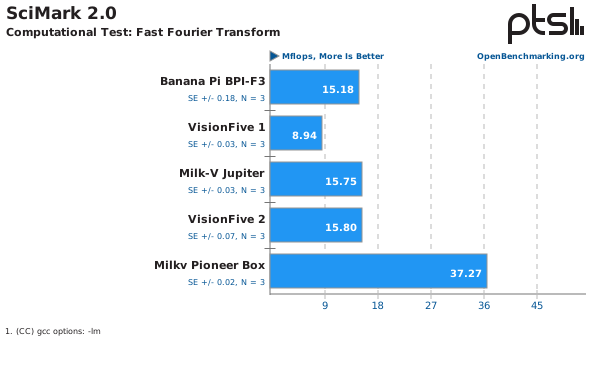
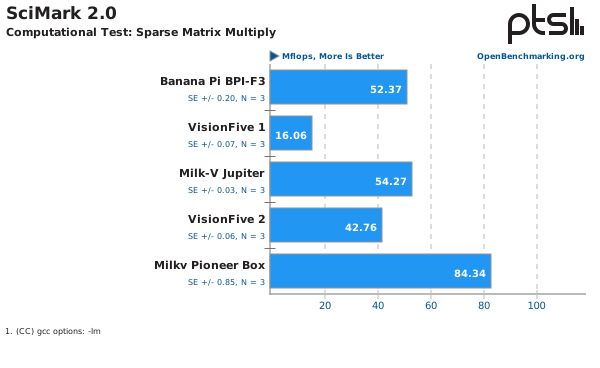
See more results and details here.
5.4 Coremark
Results for Coremark are below.
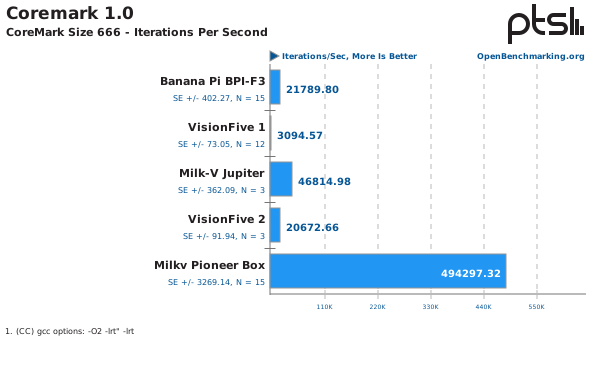
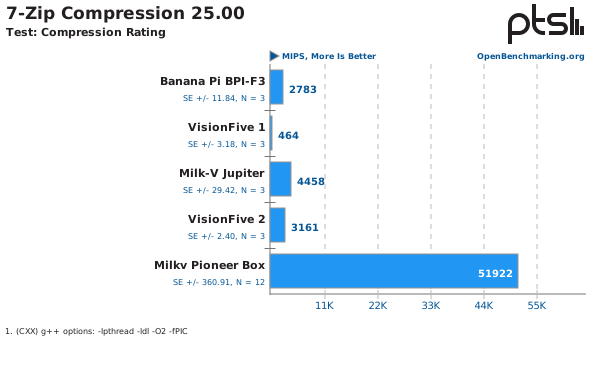
5.5 7-Zip Compression
Results for 7-Zip are below.
See more results and details here.
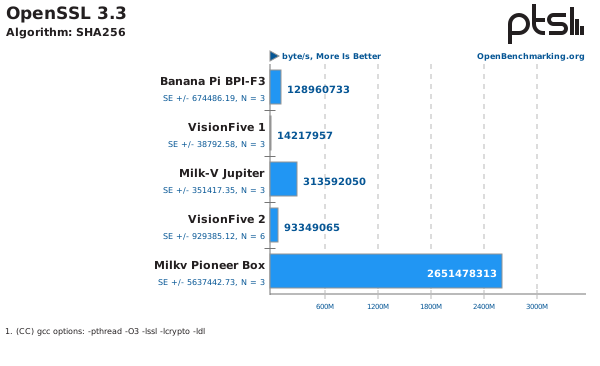
5.6 OpenSSL
Results for OpenSSL are below.
5.7 All Tests Results
Find the score for all tests and sub-tests below.
| PTS Benchmarks Name | Banana Pi BPI-F3 | VisionFive 1 | Milk-V Jupiter | VisionFive 2 | Milkv Pioneer Box |
|---|---|---|---|---|---|
| byte: Pipe | 1427859.1 | 200274.1 | 3174353.9 | 1264331.1 | 22927374.3 |
| byte: Dhrystone 2 | 34863392.1 | 4230081.8 | 79985085.7 | 27282161.8 | 879616407.7 |
| byte: System Call | 2349059.4 | 389734.2 | 4822586.5 | 1535143.6 | 30396259.3 |
| byte: Whetstone Double | 8133.2 | 804.5 | 16619.7 | 5613 | 181311.3 |
| cachebench: Read | 2911.728968 | 933.825249 | 3006.200467 | 1584.113314 | 5002.198747 |
| cachebench: Write | 2982.719945 | 3022.871145 | 3020.150867 | 5199.454205 | 11660.15364 |
| cachebench: Read / Modify / Write | 3900.046926 | 1152.9205 | 4022.971241 | 1717.756938 | 14676.57962 |
| scimark2: Composite | 62 | 24.08 | 64.17 | 54.35 | 110.08 |
| scimark2: Monte Carlo | 28.11 | 16.84 | 28.35 | 24.16 | 42.81 |
| scimark2: Fast Fourier Transform | 15.18 | 8.94 | 15.75 | 15.8 | 37.27 |
| scimark2: Sparse Matrix Multiply | 52.37 | 16.06 | 54.27 | 42.76 | 84.34 |
| scimark2: Dense LU Matrix Factorization | 73.01 | 26.88 | 75.97 | 67.47 | 115.94 |
| scimark2: Jacobi Successive Over-Relaxation | 141.31 | 51.67 | 146.54 | 121.53 | 270.04 |
| coremark: CoreMark Size 666 - Iterations Per Second | 21789.8008 | 3094.573572 | 46814.98454 | 20672.6561 | 494297.3191 |
| compress-7zip: Compression Rating | 2783 | 464 | 4458 | 3161 | 51922 |
| compress-7zip: Decompression Rating | 4728 | 771 | 10608 | 5455 | 90909 |
| openssl: SHA256 | 128960733 | 14217957 | 313592050 | 93349065 | 2651478313 |
6. Overall Results and Conclusion
Let's take another step here and get single number or index out of these results so we can compare directly the boards against that number. For that let's take average of each benchmark type and then average all the resultants again, we will call this number as "Equally Weighted Composit Index". Find the plot of final numbers below against all boards.
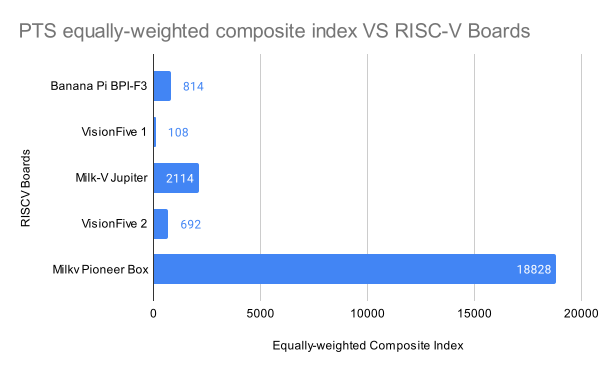
Note: The above numbers are 1% error margin. As the above result is averaged and also normalized.
Using the Phoronix Test Suite, we evaluated multiple RISC‑V SBCs across CPU, memory, and system-level workloads. The results show significant performance variation, with higher-end boards like the Milk‑V Pioneer Box excelling due to their many-core architectures (e.g., SG2042 with 64 cores), while boards like the Banana Pi BPI‑F3 and VisionFive 2 offer solid mid-range performance.
For detailed benchmark results and system information, visit OpenBenchmarking.org/user/akif for clear visualizations and insights.
7. Appendices & Artifacts
Read PTS Complete Documentation
Find Complete Script to Run all above benchmarks
View Above benchmarks results on Openbenchmarking.org